Pages in the browser
Give a single-page app on Vite the panel, and record what users do on its pages, each view and action with the API calls it made.
A single-page app runs in the browser, and its server is often a dev server that serves files, not your API. Tracepanel's Vite plugin gives such an app the badge and the panel, and records its pages in the browser: each view and what users do on it, with the API calls each made.
Add the Vite plugin
Install @tracepanel/js in the frontend and add the plugin:
// vite.config.ts
import { tracepanel } from "@tracepanel/js/vite";

export default { plugins: [tracepanel({ dir: "../backend" })] };
dir is the backend project's directory, where its .tracepanel/ is. The
plugin puts the panel's script into index.html. It serves the backend's
console on Vite's own origin, at /__tracepanel__/, so the panel and the
console work on the page.
The backend can be any app Tracepanel traces, in Node.js or in Python. A backend that serves its own console, such as Django or FastAPI, is named by its console instead:
tracepanel({ console: "http://localhost:8000/__tracepanel__/" });When the page loads before the API's first request, the plugin starts the backend's agent itself.
Call an API on another origin
The page's calls to the API go to another origin, such as
http://127.0.0.1:8000. The panel reads each call's trace from its response
headers, and the SDKs expose those headers on CORS responses, so the panel
lists every call the app makes.
Read what users do
Each view of a page is a trace: its load, or a route change in the app. So is each action on it:
- a click or a submit that called the API, named after its control, such as
click "Save" - calls the page made in the background, which no one started
A view or an action keeps its calls, its errors and its console output, with the line that logged each record. It lasts until its last call answered.
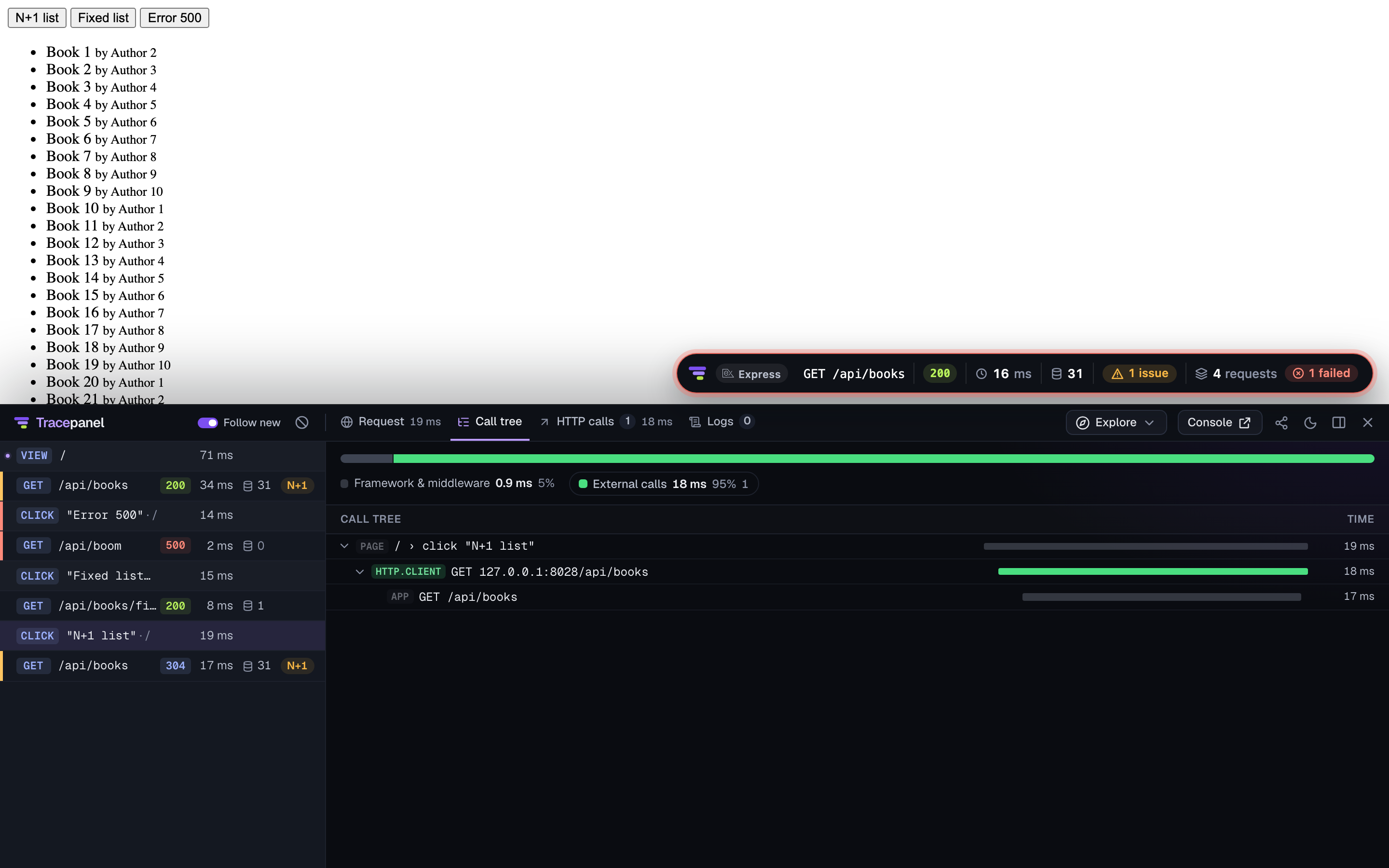
The console lists them in Pages, each view first and its actions under it. The panel lists each view and action as a row, with the requests it made under it. See The console and The panel.
A call to the page's own origin carries a W3C traceparent, so the console
links it to the API's trace. To link calls to another origin too, name it in
propagateTo. That origin's CORS must allow the traceparent header.
tracepanel({
  dir: "../backend",
  browser: { service: "shop-web", propagateTo: ["http://127.0.0.1:8000"] },
});
service names the pages' app in the console. browser: false leaves the
recording out and keeps the panel. Vite's own client logs, such as its
connection and hot reload, stay out of the pages' traces.
Record without Vite
Without Vite, call record() in the page:
import { record } from "@tracepanel/js/browser";

record({ service: "shop-web" });
It sends the traces to the console on the page's origin, at
/__tracepanel__/. api names another path. ignoreSources takes the path
prefixes of scripts whose console output isn't the page's, such as a dev
server's client.
Keep the console local
The console takes the pages' traces from this machine only. Through the Vite
plugin, it answers this machine only, even with Vite on the network
(vite --host). Its traces, and what it lets a local caller do, such as
switching the user, are for you alone.